
KEB has expanded its COMBIVIS software suite with a new real-time dashboard for its S6 and F6 drive controllers. The COMBIVIS Dashboard provides live monitoring, torque tracking, and fast diagnostics through an intuitive interface. It includes snapshot tools for exporting parameters, verifying drive status, and streamlining maintenance and configuration. Integrated into the broader COMBIVIS platform—including mobile apps and scripting tools—the dashboard enhances visibility and reliability in automated systems while supporting flexible access from desktop or mobile devices.

The updated COMBIVIS Dashboard offers real-time visualization and comes with a snapshot function. Image used courtesy of KEB
Streamlining Device Monitoring
Designed to service and configure KEB inverters, the new software solution's dashboard provides users with hardware and application data at a glance, enabling them to conduct quick analyses and make informed decisions. The new dashboard offers live updates on current limits, torque, and other parameters, enabling precise diagnostics and enhanced performance. For simplified hardware verification, the dashboard offers terminal status verification for the connected drive.
When it comes to fault diagnostics, the new COMBIVIS Dashboard offers detailed error logs and real-time exception tracking, which speeds up troubleshooting by providing a clear event timeline. Additionally, service users can export a summary of parameters through a snapshot functionality, which offers drive configuration analysis and ensures uniform setup across systems.
How the Dashboard Fits into the COMBIVIS Ecosystem
The new COMBIVIS Dashboard is featured as an extension within the broader COMBIVIS 6 software platform, which provides a centralized platform for KEB's drive product management. Moreover, it has features such as fieldbus diagnostics, performance monitoring, and parameter configuration. The COMBIVIS 6 platform also enables firmware updates and access to manuals.
The platform features the COMBIVIS wizard tools, allowing quick setup and troubleshooting through guided workflows. Advanced tools, such as the multi-channel oscilloscope, offer detailed analysis of measured variables. For more advanced automation projects, the COMBIVIS Command Line Interface (CLI) provides a silent programming option well-suited for OEMs and machine manufacturers who must carry out offline diagnostics, batch configuration, and production-level scripting.
To extend drive monitoring to smartphones and tablets via WiFI or Bluetooth, the COMBIVIS Mobile App supports S6 and F6 controllers, offering a user-friendly interface for accessing error logs, parameter lists, and I/O status checks. With the mobile application, data can also be backed up and restored without needing a computer.
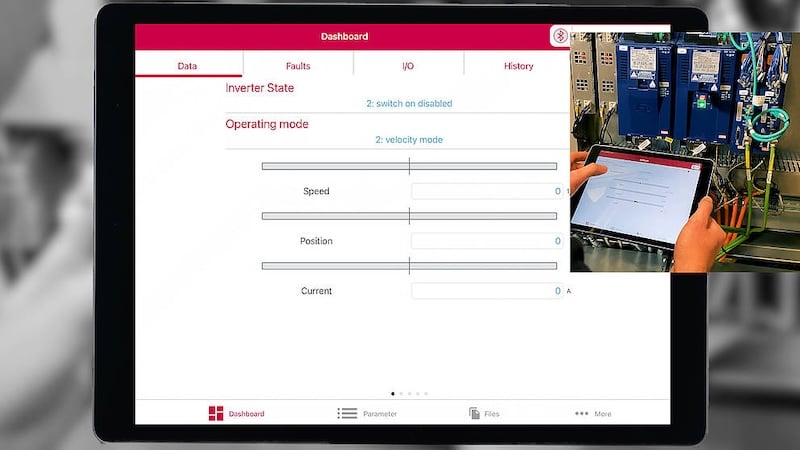
The dashboard of the COMBIVIS Mobile application displayed on a tablet connected via Bluetooth. Image used courtesy of KEB
The new COMBIVIS Dashboard integrates seamlessly with existing ecosystems, enhancing workflows for both mobile and desktop devices and providing a centralized view of drive status while maintaining the familiar environment that KEB users rely on.
Data Visualization
The new dashboard is designed to specifically work with the COMBIVERT S6 and F6 driver families for diagnostics data visualization, eliminating the need for additional tools. This makes the new solution suitable for engineers seeking reliable routine maintenance and rapid fault analysis solutions for their complex automated systems. The COMBIVIS Dashboard add-on can be accessed through direct contact with KEB to get started with the new dashboard.